Record Tests Without Writing Code
Click record, use your site, export. Smart selectors and real-time preview make test creation as easy as recording a video.

From Click to Test in 4 Steps
No setup wizards. No configuration files. Just record and go.
Click Record
Open the extension and hit the record button. A visual indicator appears.
Use Your Site
Navigate, click, type, submit forms. Every action is captured in real-time.
Review & Export
See your recorded steps, add assertions, then export or submit.
Run Automated Tests
QAlimucho converts your recording to executable test code automatically.
Record WooCommerce Checkout Tests That Actually Work
Smart features that make test recording reliable, not frustrating.
Record Like a Video
No coding required. Click, type, navigate — we capture everything. Pause and resume anytime.
Smart Selectors
AI-powered element targeting with confidence scores. Prefers test IDs, falls back gracefully.
Real-Time Preview
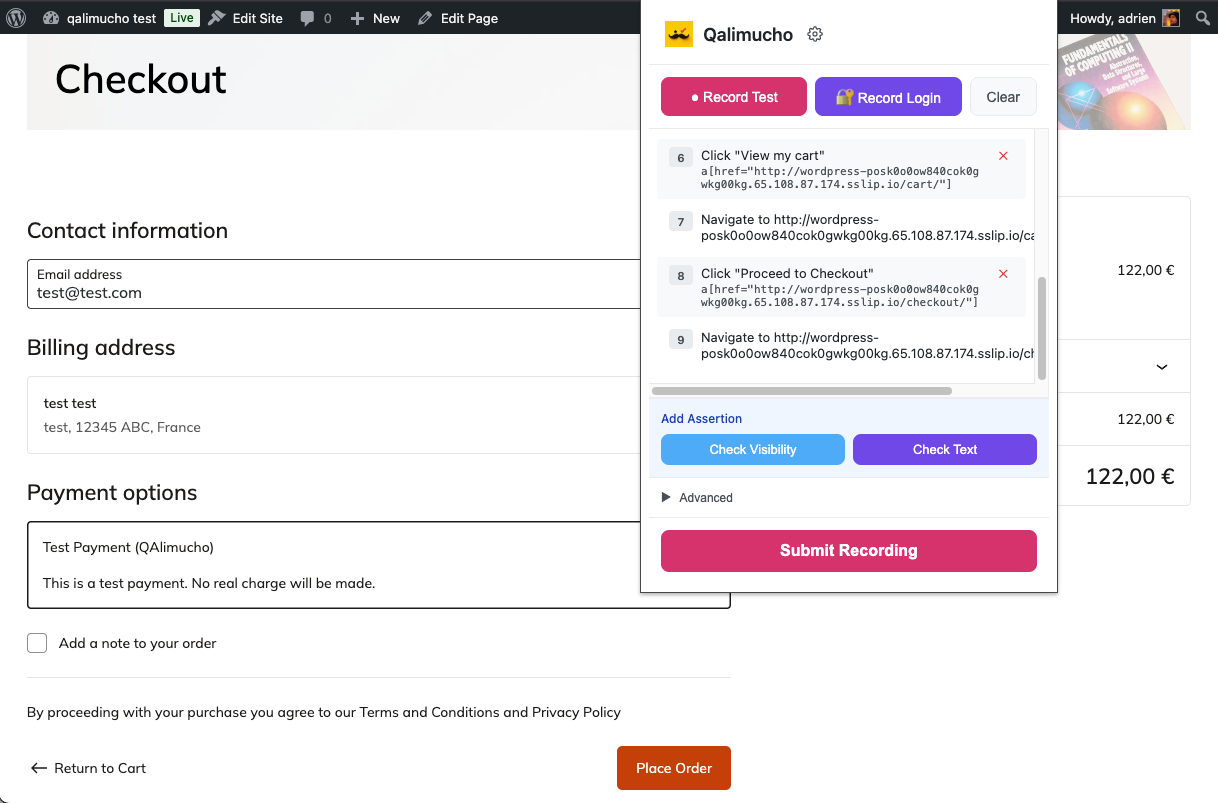
Watch your test steps appear as you record. Delete unwanted actions with one click.
Export Anywhere
Output JSON format that can be converted to anything you need in your toolchain.
WooCommerce Ready
Auto-detects QAlimucho plugin. Test checkouts without real payments.
Get the pluginCredential Management
Record login flows once. Reuse across tests. Stored securely on your account.
Selectors That Don't Break
Most test recorders create fragile selectors that break when your UI changes. Our AI prioritizes stable identifiers and scores each selector's reliability.
data-testid, data-cy,
data-qa
Built For Your Workflow
Whether you're a solo developer or part of a QA team, QAlimucho fits right in.
QA Teams
Create regression test suites without writing code. Non-technical testers can build comprehensive tests.
Developers
Generate baseline tests from user flows. Catch regressions before they hit production.
E-Commerce
Test checkout flows on WooCommerce, Shopify, or any store. Verify payments work before customers complain.
Small Teams
Get enterprise-level test automation without hiring a QA team. One person can maintain hundreds of tests.
See It In Action
Real recording session on a WooCommerce checkout flow.
Works With Your Browser
Compatible with all Chromium-based browsers
Frequently Asked Questions
Everything you need to know about the QAlimucho extension.
The extension works on all Chromium-based browsers: Google Chrome, Brave, Arc, Microsoft Edge, Opera, and Vivaldi.
No. Recording is point-and-click. QAlimucho automatically converts your recordings into test code. You never touch code unless you want to.
We prioritize stable selectors: test IDs, unique element IDs, ARIA labels. If those aren't available, we use text content and CSS selectors with context. Each selector gets a confidence score so you know how reliable it is.
Yes. The extension includes a credential recording mode. Record your login once, and QAlimucho securely stores it for future test runs.
Yes. The extension works on any website you can visit in your browser — your own apps, client sites, competitor analysis, anything.
Install our free WordPress plugin. It adds a test payment gateway that always succeeds. The extension auto-detects it and enables test mode.
Start Recording Tests Today
Install the free extension, record your first test in minutes, and stop worrying about broken user flows.
Works with Chrome, Brave, Arc, Edge, Opera, and other Chromium browsers